Workain

From scattered AI chats to managed AI work

Workain: the control room for your AI agents.

Your team is already using AI. Right now, none of it is visible to you — or shared with anyone else.

Every day, people on your team ask Claude or ChatGPT for help, work out a fix, and it stays exactly there — in their own chat history, invisible to a lead, gone for good the day they move on. Nothing compounds. Nothing gets reviewed. Workain gives you one workspace you actually control instead: every agent session visible, every file real, every good habit something the next person can build on instead of re-discovering from scratch. Today that means a real control room for coding agents — Claude Code and Codex CLI sessions running in parallel, in a browser tab, on your own subscriptions, in a workspace you control — never the model vendor's cloud; only the model calls go out.

Running agents already

You already keep 2+ CLI sessions going — a real habit, but a personal one: alt-tabbing between panes, nobody else able to see what's happening or step in. Workain turns that into a shared, controlled workspace: same agents, same subscriptions, one honest board your team can actually see.

Never launched one

AI is already changing how work gets done — you just don't have a way in past a personal chat window. Get an agent working for you without it becoming another scattered, unmanaged habit: we hand you a workspace with the agent already running, open a tab and go.

A team or company

Right now, whatever your team is doing with AI lives in scattered personal chats — invisible to you as a lead, with no shared record and no way to know what happens to company data. Workain gives your team one workspace: provisioned per person, one status board across every session, in an environment you control, not the model vendor's.

Where this is headed — labeled as vision, not shipped

The destination: an operating room for your AI department

The control room above is what's actually built and dogfooded today — Tier-2 power users running real coding-agent sessions, nothing further. The destination we're building toward is bigger: a persistent, transparent team of specialist agents you manage the way you'd run a department — any model, your own files, honestly measured. Today's control room is the first wedge toward that, not the whole of it — treat the rest of this section as direction, not a feature list already shipped.

The advantage compounds over time: what makes a workspace more valuable isn't which model it runs — models become available to everyone — it's the rules, examples, quality criteria and corrected mistakes your team has already fed back into it.

The promise boundary

We don't promise to replace your team or full autonomy. We promise to help you safely hand agents a real, defined piece of your work, make the process visible, and grow that scope only as quality is proven.

What Workain is NOT

  • Not another chat UI over models — the unit is a team, not a chat.
  • Not a workflow builder — agents are specialists in a live workspace, not nodes in a graph you pre-wire.
  • Not (only) a coding-agent dashboard — the design targets general knowledge work, not just code; today's control room leads with coding agents as the wedge, not the whole of it.
  • Not a fixed, narrow bot you can't adapt — agents are configured (roles, tools, rules, examples), not hard-coded once and shipped closed.
  • Not a model-API proxy or gateway — genuine native agent processes under your own auth; we never resell provider inference.
  • Not a developer framework — you manage it through a UI like running a department, not by writing framework code.
  • Not a promise to replace your team with a universal "virtual employee" — see the promise boundary above.

Three real cases, not a list of professions

What a Workain session actually does

Chosen to be honestly demoable and continuously improved, rather than a long list of professions we haven't actually tried. Each case below is real E2E capture against a live workspace — not a mockup — with the honest verdict stated plainly, gaps included.

Against the tools you already use

What's actually different here

Not a feature list — a direct contrast against Claude Code's own CLI, ChatGPT, and the closest real competitors.

01

A status board that never lies to you

Claude Code's CLI has no fleet view at all — you check each terminal yourself. ChatGPT's Codex reports status for its own cloud tasks, but nothing watches your local CLI sessions across providers.

Four primary states, each requiring positive evidence before it's shown: working, idle, your turn, problem — plus explicit infrastructure states (like "no report received") shown as exactly that, instead of being guessed into one of the four. A session mid-tool-call stays working for however long that genuinely takes — never flipped to a false "done" because the screen went quiet.

02

Real files, not an ephemeral thread

A ChatGPT thread's outputs live inside that one conversation — scroll back or lose it.

Every session here works out of a real folder on disk, in your own controlled workspace — not in a sandbox at the model vendor. What it produces is a real file you can browse independently of the chat that made it — days or logins later. Close the tab, come back tomorrow: the project → folder → session tree and everything in it is exactly where you left it.

03

Your subscription. Your vendor choice. Every session.

No shared house account, no single vendor you're locked into.

Every session is a genuine native CLI process authenticated with your own account — never a key this product holds on your behalf, never a shared house account. Run Claude Code and Codex side by side in the same workspace, switch providers per session, and each session's provider traffic goes straight from that session to the provider — nothing pooled, nothing re-routed. See the architecture that backs this ↓

04

The real competitors, addressed directly — not dodged

Conductor and Agent Deck are the closer, real analogs — not just Claude Code's bare CLI or ChatGPT.

Conductor runs Claude Code and Codex in parallel worktrees well, but it's a native Mac-only app — one install per machine. Agent Deck is closer in spirit — self-hosted, built on tmux like we are — but it's a terminal TUI you install and run per machine (its web view is local-only, not a hosted one you can reach from another device). Workain is a browser tab: no install, no OS requirement, check your fleet from whatever device you're on right now. During early access your sessions run in a workspace we provision on a dedicated machine — self-hosting on your own box is where the model is heading.

See it for real

Real captures of the current build, taken in a demo workspace we set up for this page. The states are genuine — the crash below really crashed — but the scenarios were staged for legibility, and the app UI still wears the product's original working name, harness-control, until the in-app rebrand lands. Click any screenshot to enlarge.

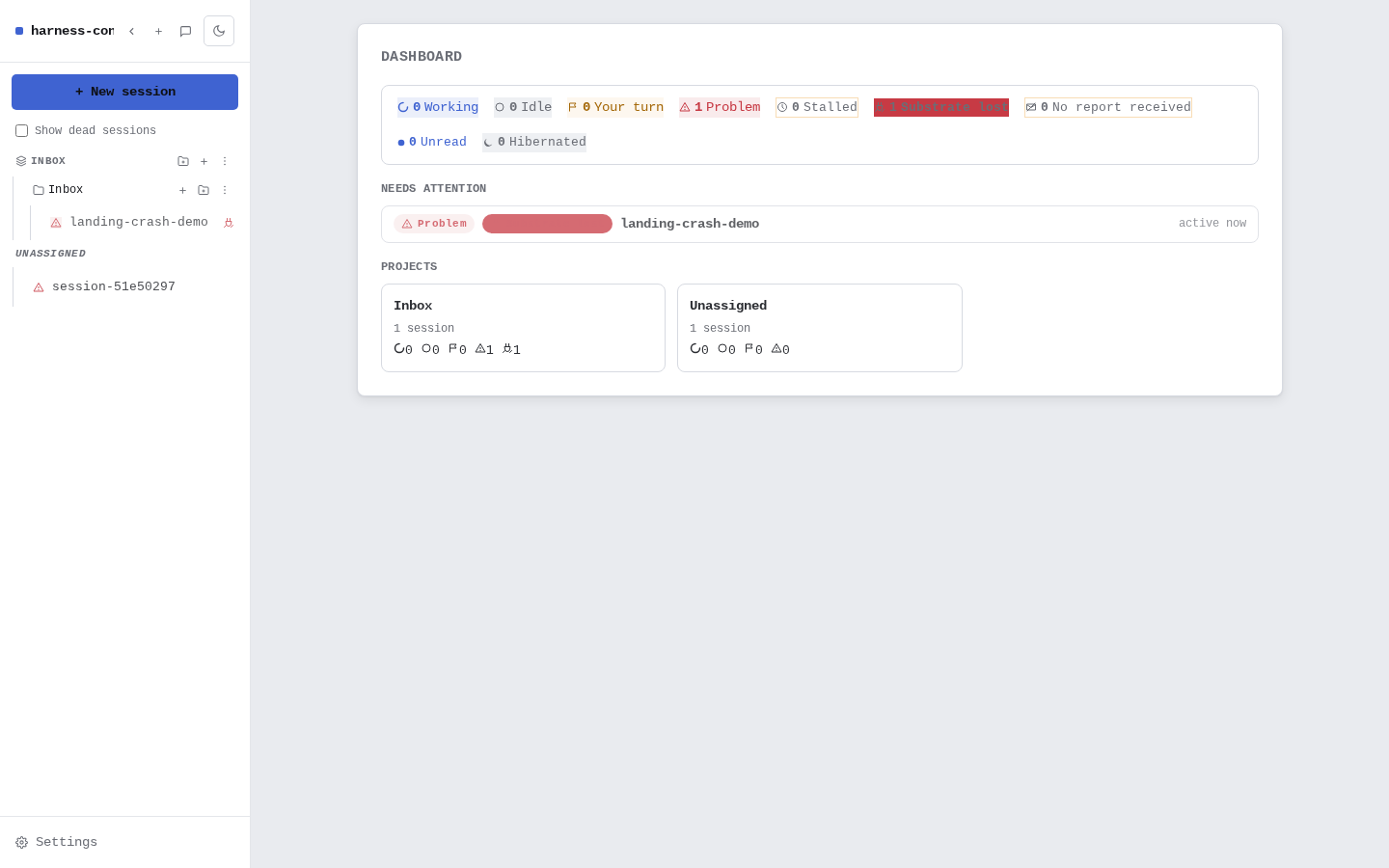
Workain dashboard with one session in the Problem state and per-state counters
The dashboard, honest about a failure. That "1 Problem" is a session we crashed on purpose for this page — the name in the screenshot says so — and the board reports it as a real failure, because it is one.
Crashed session header with the badge flipped to INACTIVE Message input of the crashed session, disabled, reading: session looks inactive (bare shell, not the agent) — sending is disabled
What "Problem" actually means. Two details from the crashed session, cropped for legibility: the header badge flips to INACTIVE, and the message input is genuinely disabled — not just styled to look that way.
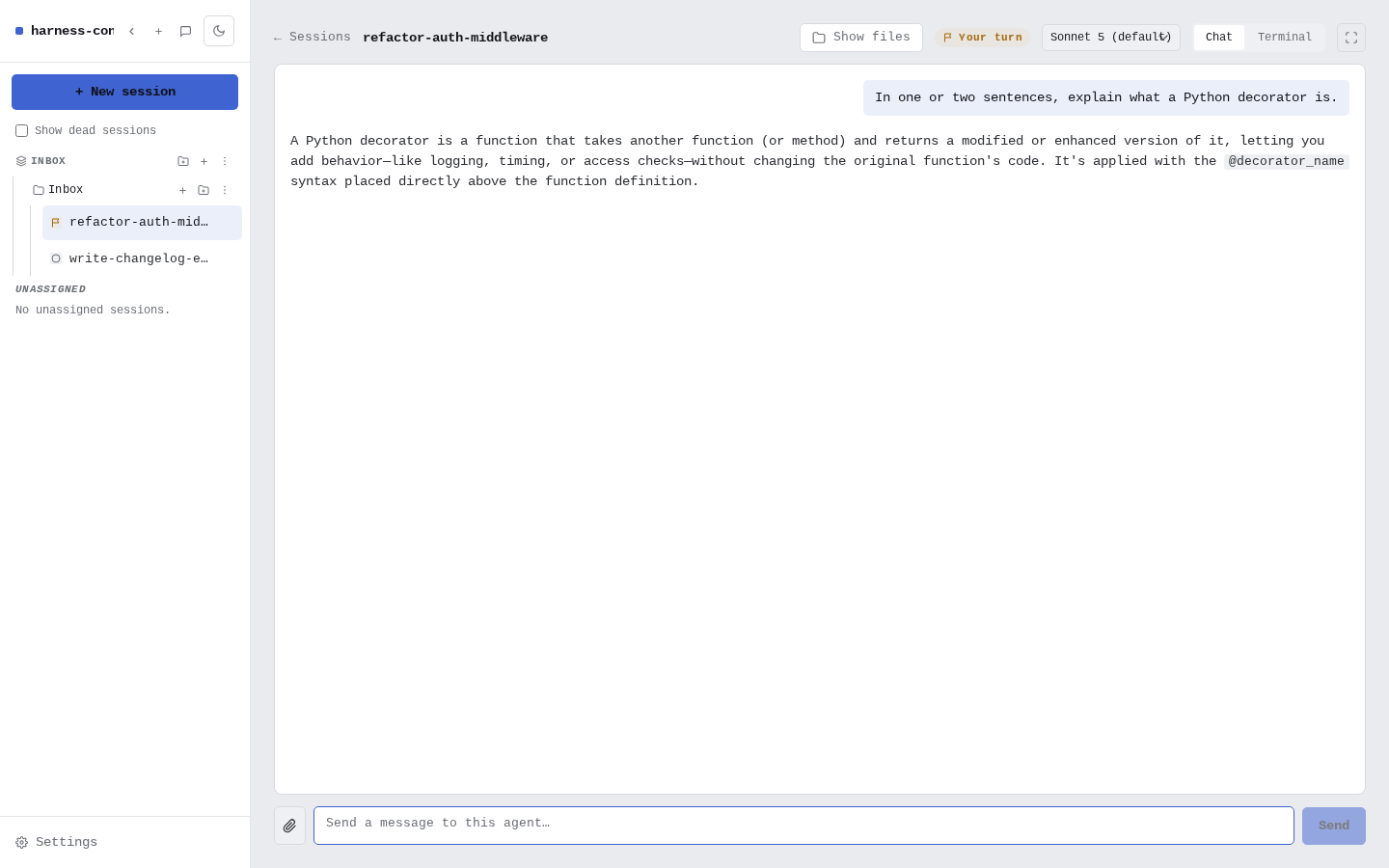
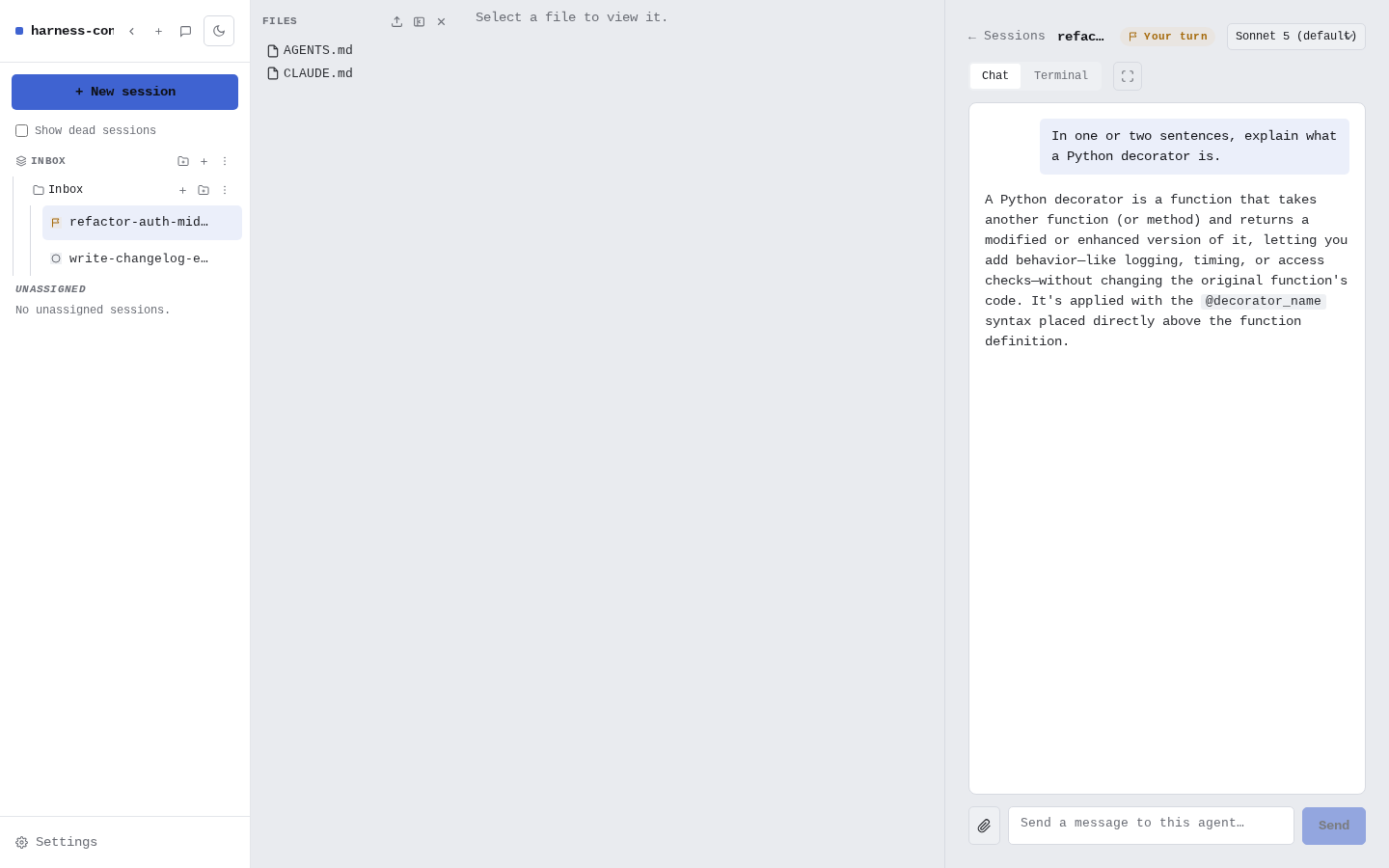
Workain chat view rendering a Claude Code reply as structured chat
A real turn, rendered as chat. An actual Claude Code reply in the demo session — structured chat, not a raw terminal dump. (Yes, we asked it a softball; this shot is about the rendering.)
Workain file panel listing the session's own files next to the chat
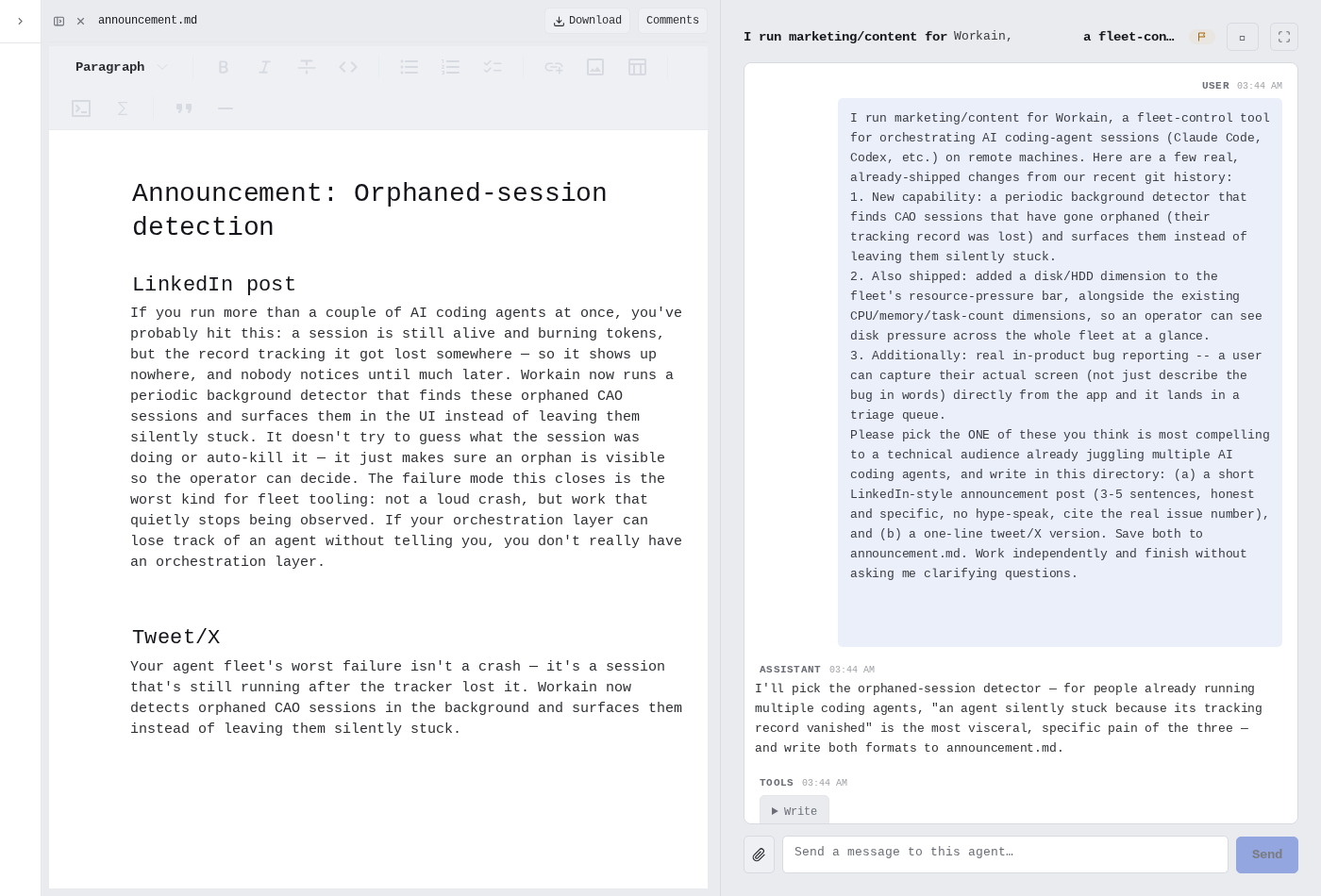
The session's files, next to the chat. AGENTS.md and CLAUDE.md listed straight from the session's own folder on disk — browsable independently of the conversation that made them.
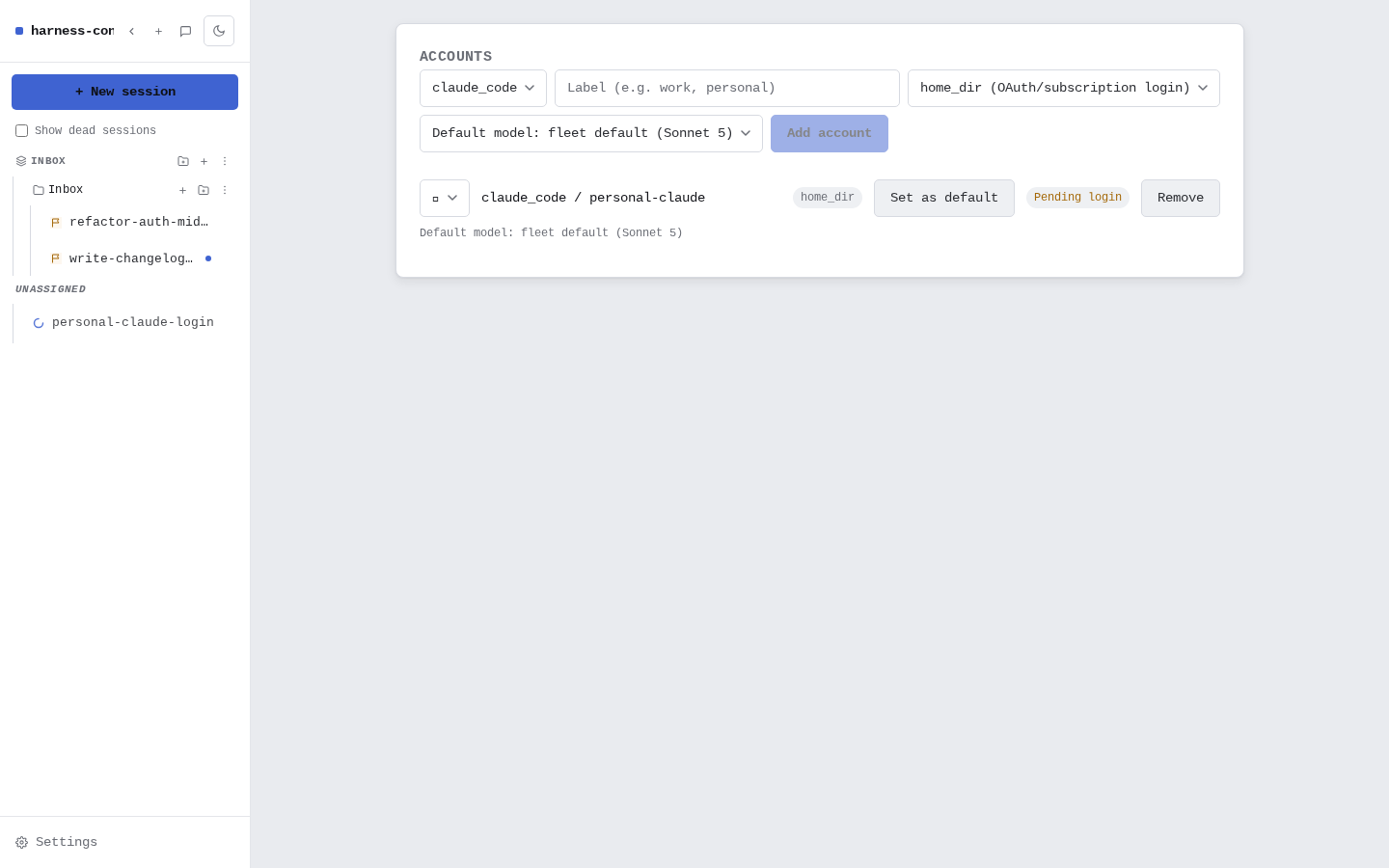
Workain accounts page with a Claude Code subscription login being attached
Your own logins, added plainly. A Claude Code subscription login being attached to a workspace — OAuth/subscription auth, no API keys held on your behalf.
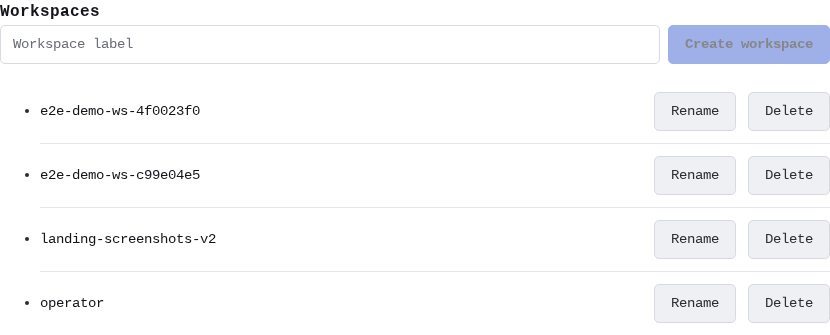
Workain admin panel listing workspaces, including the demo workspace used for these screenshots
Admin, kept boring on purpose. Workspace provisioning is a short, deliberate list — including the demo workspace these screenshots were taken in.

How it's built

Genuine processes. Nothing routed through a shared key.

Workain orchestrates the same native CLI binaries you'd run over SSH — it just gives every session a real place to live, a real status, and a browser tab instead of a terminal multiplexer.

Auth model
Your own provider login, per session
Providers today
Claude Code · Codex CLI
Where sessions run
A workspace you control — your machine or a box we host — never the LLM provider's cloud
Provider traffic
Straight from the session to the provider — no proxy, no pooled key

Plainly, on hosting: during early access your workspace runs on a dedicated machine we operate — your provider logins stay yours, and each session's provider traffic goes directly from that workspace to the provider. Self-hosting on your own box is where the model is heading. Source is closed during early access — every architecture claim above is verifiable by testers directly against a running workspace, and we're glad to walk through the design on request.

Not just this product

We research every layer of the agent harness — and test the claims

Workain is both the company and this product — and behind it runs our research program into every layer of an agent harness: the instructions and identity an agent runs with, its tools and skills, the memory and data behind it, and the gates that keep it honest. The first component class we've fully live-evaluated is memory systems; the rest of the catalog is being worked through the same pipeline.

The harness equipment registry

A structured, sourced catalog of agent-harness components and bundles — and, where we've actually run the benchmark ourselves, an honest tier verdict instead of a vendor's own claim.

109components cataloged as of Jul 2026 — access/MCP, subagents, skills/tools, memory, instructions

Of the 11 memory systems cataloged, 6 are live-tested and 7 carry tier verdicts — one (OpenAI's Conversations API) is tiered from source review because there is no client-side algorithm to run, and its entry says so. Best result to date: tier B (Anthropic's own Memory Tool) — nothing has earned an A yet, and the entry says so.

github.com/workain/agent-harness-registry →

The registry is opening up publicly right now — if the link above still says 404, the public flip is mid-flight; early-access testers get a walkthrough today either way.

Notes & findings

Short write-ups from actually running this stuff, not vendor claims. All posts →

News

What's new

  • 2026-08-22 New write-up: localizing agent failures. Which layer actually broke when an agent misbehaves — a rule for classifying by interaction edge rather than symptom, six checks worth running before blaming the model, and the honest limits of the taxonomy it is built on. In the blog.
  • 2026-07-22 Sessions now run in a separate git worktree by default, reducing accidental file/branch collisions with other sessions in the same folder. Checkbox and branch picker in session creation, branch badges on folders/sessions, an orphaned-worktree view in workspace settings; overridable per session, folder, or project. Automatic registration and cleanup ship in the same release. Write-up in the blog.
  • 2026-07-20 Site refresh. Access requests and contact now send straight from the page, screenshots open full-size, and the research registry is linked from the front page. Memory scoreboard updated: 6 live-tested, 7 tiered.
  • 2026-07-18 First research write-ups published. The memory-systems scoreboard, field notes on running multiple agents, and our test-everything-live methodology — all in the blog.
  • 2026-07-18 Early access opens. workain.ai goes public and the first tester cohort starts onboarding, by hand, a few at a time.

Not asking for access

Other ways to reach us

Found a mistake in something we published? Have a security report, a press or partnership question, or something else that isn't "I want a workspace"? Use this instead of the access-request form below — it goes to the same inbox, read by a person.

Sends straight from this page to our inbox — no third-party form processor involved. Prefer plain email? contact@workain.ai works too.

Early access · Free while we onboard the first testers

Currently onboarding a small group of testers

Request access

We're bringing on the first testers by hand right now, a few at a time, while we finish hardening the fleet — free for the length of early access. Every request is read by a real person, not a queue. Tell us what you're running today and we'll set up your workspace.

Sends straight from this page — the inbox behind it is read by a person, not a queue. Prefer plain email? contact@workain.ai is the same pipeline.

No customers or testimonials yet — we're genuinely pre-launch, so you'd be among the first hands-on testers, not case study #40. Every claim on this page is checkable by testers directly against a running workspace, and the registry's public slice is being prepared right now.